Kubernetes Security: A Deep Dive
Kubernetes Security: A Deep Dive with Falco
Introduction to Kubernetes
Before we dive into security, let’s recap the core components of a Kubernetes cluster:
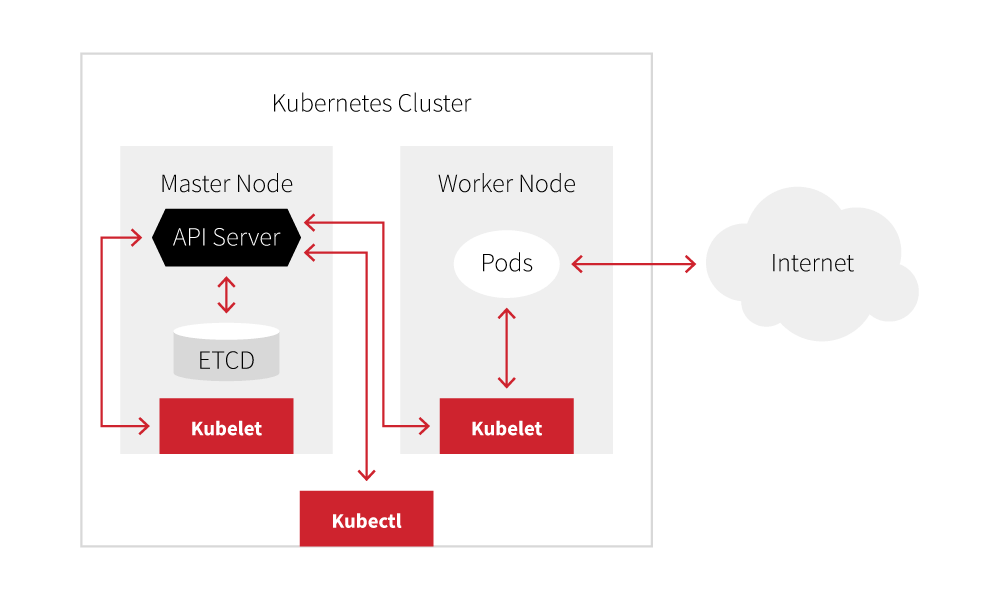
- Kubernetes Cluster: The entire environment housing your applications.
- Master Nodes: Responsible for managing the cluster.
- Worker Nodes: Where your workloads (pods) run.
- Pods: The smallest deployable units in Kubernetes, containing one or more containers.
- kubectl: The command-line tool for interacting with the Kubernetes API server.
- API Server: The central point of communication for all Kubernetes operations.
- etcd: A key-value store that holds the cluster’s state.
- Kubelet: An agent running on each node, responsible for communicating with the API server and managing pods.
The 4C Model of Cloud Native Security
To effectively secure your Kubernetes environment, it’s crucial to adopt a holistic approach. The 4C model provides a framework for addressing security across different layers:

- Cloud: Secure the underlying cloud infrastructure on which your cluster resides. This includes configuring network security, access controls, and identity management.
- Clusters: Secure the Kubernetes cluster itself by implementing strong authentication and authorization, network policies, and resource quotas.
- Containers: Ensure your container images are free of vulnerabilities and adhere to security best practices. This involves scanning images, using minimal base images, and implementing least privilege principles.
- Code: Develop secure applications by following secure coding practices, performing regular security testing, and addressing vulnerabilities promptly.
Attack Vectors
Common Kubernetes attack vectors:
Vulnerable Applications (Code)
Applications with vulnerabilities like SQL injection, insecure deserialization, or SSRF can be exploited to gain a foothold in the cluster.
Container-Related Attacks
- Malicious Images: Attackers can inject malicious code into container images, either during the build process or by directly modifying existing images. Always verify the integrity and source of your images.
- Suspicious Registry Locations: Avoid pulling images from untrusted or compromised registries. Stick to official sources and reputable registries.
- On-the-Fly Container Modifications: Attackers might exploit vulnerabilities to modify containers during runtime. This could involve changing files, injecting malicious processes, or altering configurations.
Cluster-Related Attacks
- Reverse Shell Creation: Attackers often try to establish reverse shells to gain remote access and execute commands within containers.
- Command Execution in kube-system Namespace: The
kube-systemnamespace contains critical cluster components. Attackers gaining access to this namespace can potentially disrupt the entire cluster. - Secret Enumeration: Kubernetes secrets store sensitive data like passwords and API keys. Attackers might exploit weak access controls or misconfigurations to access these secrets.
- Pod Escaping Using Sensitive HostPath Volumes: Mounting sensitive host directories into containers using
hostPathvolumes can be risky if not properly secured. - RBAC Misconfigurations: Overly permissive RBAC roles can grant attackers unauthorized access to cluster resources.
- Exposed Kubelet API: The Kubelet API, if exposed without proper security, can be exploited to manipulate containers or gain node-level control.
- Namespace Bypass: While namespaces provide isolation, they don’t inherently enforce strong security boundaries. Attackers can exploit weak network policies or misconfigurations to access resources in other namespaces.
Hands-on Labs with Kubernetes Goat
To gain practical experience with Kubernetes security, I recommend exploring Kubernetes Goat, a deliberately vulnerable cluster environment:
- Kubernetes Goat: https://madhuakula.com/kubernetes-goat/docs/
This platform allows you to experiment with various attack scenarios and learn how to detect them using Falco.
eBPF for Kubernetes Security
Traditional security tools often struggle in containerized environments due to limited visibility, the dynamic nature of pods, and the prevalence of encrypted traffic. eBPF addresses these challenges by providing deep visibility into container activity at the kernel level.
eBPF allows for:
- Enhanced threat detection: Detect suspicious activities like privilege escalation, unauthorized access, and malicious network connections.
- Improved incident response: Quickly identify the root cause of security incidents and understand the extent of a compromise.
- Real-time security policy enforcement: Prevent malicious actions before they cause damage.
- Deep network visibility: Monitor network traffic between pods, even with encryption.
Implementing Falco for Runtime Security
Falco is an open-source runtime security tool that uses eBPF to monitor system calls and detect anomalous behavior. It provides a powerful rules engine for defining security policies and generating alerts.
Installation
helm repo add falcosecurity https://falcosecurity.github.io/charts
helm install falco falcosecurity/falco --set "falcoctl.config.artifact.install.refs={falco-rules:2,falco-incubating-rules:2,falco-sandbox-rules:2}" --set "falcoctl.config.artifact.follow.refs={falco-rules:2,falco-incubating-rules:2,falco-sandbox-rules:2}" --set "falco.rules_file={/etc/falco/k8s_audit_rules.yaml,/etc/falco/rules.d,/etc/falco/falco_rules.yaml,/etc/falco/falco-incubating_rules.yaml,/etc/falco/falco-sandbox_rules.yaml}"
Usage
k logs -f daemonset.apps/falco
Falco Sidekick
For advanced log management and alerting, integrate Falco with Falco Sidekick:
- Falco Sidekick: https://github.com/falcosecurity/falcosidekick
Falco Sidekick allows you to forward Falco events to various outputs like Slack, Elasticsearch, and Kafka.
Example Falco Logs
15:56:24.543183236: Warning Sensitive file opened for reading by non-trusted program (file=/etc/shadow gparent=containerd-shim ggparent=systemd gggparent=<NA> evt_type=open user=root user_uid=0 user_loginuid=-1 process=cat proc_exepath=/usr/bin/coreutils parent=bash command=cat /etc/shadow terminal=34816 exe_flags=O_LARGEFILE|O_RDONLY container_id=bb74e3dc000c container_image=docker.io/madhuakula/hacker-container container_image_tag=latest container_name=hacker-container k8s_ns=default k8s_pod_name=hacker-container)

15:56:31.936939624: Notice Unexpected UDP Traffic Seen (connection=10.244.1.160:44136->142.250.65.196:65535 lport=44136 rport=65535 fd_type=ipv4 fd_proto=fd.l4proto evt_type=connect user=root user_uid=0 user_loginuid=-1 process=curl proc_exepath=/usr/bin/curl parent=bash command=curl -I https://www.google.com terminal=34816 exe_flags=<NA> container_id=bb74e3dc000c container_image=docker.io/madhuakula/hacker-container container_image_tag=latest container_name=hacker-container k8s_ns=default k8s_pod_name=hacker-container)
Integrating Falco with Elasticsearch
To centralize Falco logs and enable powerful searching and visualization, integrate Falco with Elasticsearch:
helm install falco falcosecurity/falco \
--set "falcoctl.config.artifact.install.refs={falco-rules:2,falco-incubating-rules:2,falco-sandbox-rules:2}" \
--set "falcoctl.config.artifact.follow.refs={falco-rules:2,falco-incubating-rules:2,falco-sandbox-rules:2}" \
--set "falco.rules_file={/etc/falco/k8s_audit_rules.yaml,/etc/falco/rules.d,/etc/falco/falco_rules.yaml,/etc/falco/falco-incubating_rules.yaml,/etc/falco/falco-sandbox_rules.yaml}" \
--set falcosidekick.enabled=true \
--set falcosidekick.config.elasticsearch.hostport="https://es_url:443" \
--set falcosidekick.config.elasticsearch.customheaders="Authorization: ApiKey api_key"
ref: